
Vy by Vercept
Created the computer interface of the future to enable task automation across Windows and macOS.
- Team
- — Small startup (8-15 people)
- Industry
- — AI, Computer vision
- Website
- — vercept.com
Tools & technologies
The Problem
Users spend hours on repetitive desktop tasks—existing automation tools require technical expertise and AI assistants can't see or interact with the desktop—so we enabled users to confidently delegate those tasks to an AI that can see and act on their desktop, with full transparency and easy intervention.
Step 2 — Process
Process & Approach
Key Challenges Overcome
Challenge 1
The interaction model: choosing between a large window (full control and access to everything) and a small window (minimal footprint) without sacrificing either transparency or efficiency.
Solution
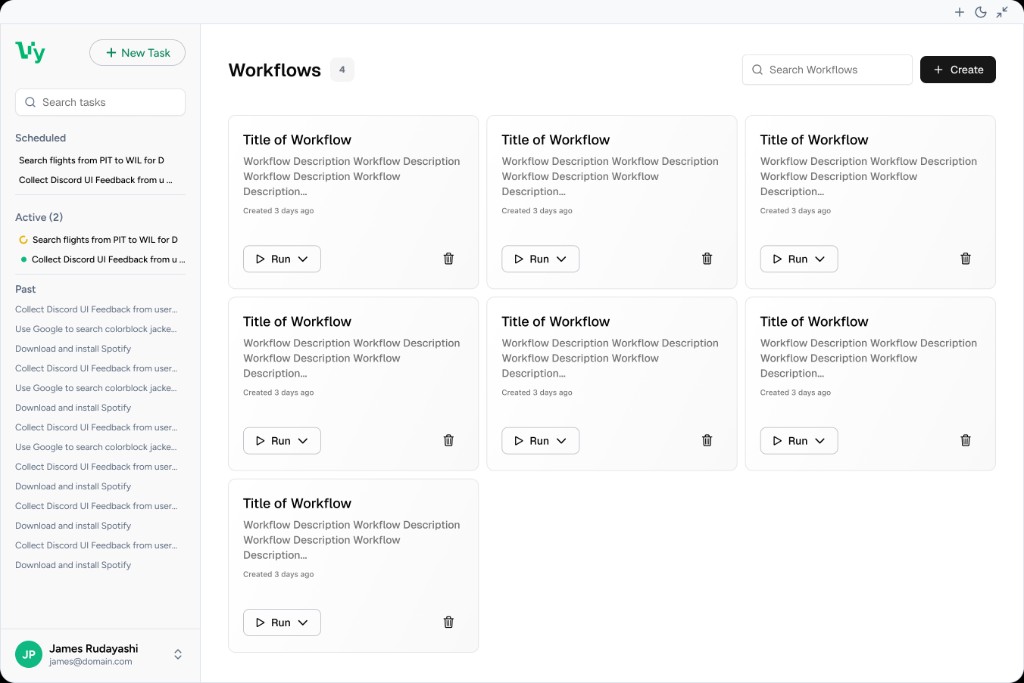
Designed a flexible layout with a resizable main view and a compact running view. Users get full access to prompting, context, and controls in the large window, and can collapse to a compact view that shows progress and essential controls so they keep context without losing screen space. The sidebar stays persistent so navigation and task management are always one click away.
Challenge 2
Running multiple asynchronous streams of tasks at once—allowing users to start several tasks in parallel while keeping each stream's state, progress, and controls clear and independently manageable.
Solution
Built a real-time multi-stream session service using Combine and async/await so the app can run several conversations and task streams simultaneously. Each stream has its own state and UI representation; the compact view and sidebar make it easy to see what's running and switch or intervene. Reactive updates keep all streams in sync without blocking the main thread.
Research & Ideation
I started by mapping existing automation paradigms—keyboard shortcuts, AppleScript, Automator—and identified their common failure: they require users to think like programmers. I ran focused research on interaction models (voice-first, chat-based, transparency-first) and information architecture so the product could scale from simple one-off tasks to complex workflows. Early feedback from the Discord community shaped priorities: users wanted full control and visibility, not black-box automation. I prototyped several interaction model concepts before landing on one that prioritizes transparency over 'magic'.
Design & Interaction Model
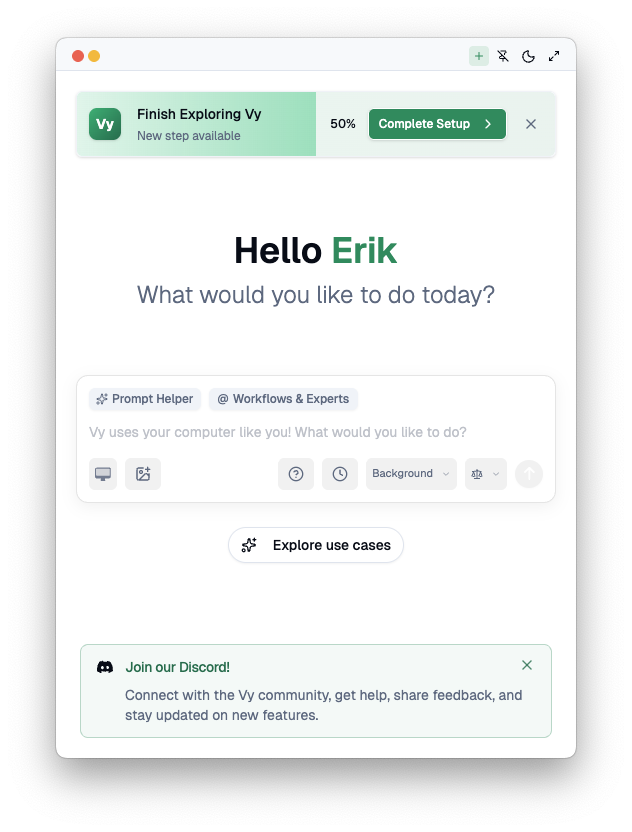
The core design insight was to provide a large window for power users who want to fire off multiple background tasks at once, manage workflows, automations, schedules, and more—and a small, compact window for full control only, or for users who prefer to work in a minimal footprint. Unlike cloud assistants that only suggest next steps, Vy runs on your machine and completes tasks hands-on, so you stay in control. The interaction model keeps task status, progress, and controls visible so you always know what’s running and can step in when you want—transparency and local execution became the foundation for trust.
Engineering the Vision Pipeline
The engineering challenge centered on concurrent streams: running several vision and task streams in parallel so users could fire off multiple background tasks at once without dropping frames or blocking the UI. I built a multi-stream session layer so each conversation and task stream has its own state and UI; reactive updates keep all streams in sync. Underneath that, a capture loop with strict latency budgeting (<100ms), window targeting, and efficient frame differencing keeps arbitrary applications responsive while feeding multiple streams.
Core Interface Focus Areas
Left sidebar — Navigation & task management
Task status (in progress, complete), organization (active, scheduled, completed), + New Task, search, and past tasks. Workflows, Schedules, Experts, and Blueprints live here.
Main input view — Prompting, context, and controls
Main prompt: “What would you like to do today?” Prompt Helper and @ Workflows & Experts, plus screen/screenshot context. History and Background controls for transparency and background runs.
Compact running view — Progress without losing context
Running state, recent steps, and essential controls in a small footprint so users can monitor and intervene without leaving the main view.
Final design
Step 3 — Outcome
Outcome & Reflection
Results & Impact
- ✓Shipped concurrent background execution so users could run multiple tasks at the same time
- ✓Designed, built, and shipped multiple iterations of both the Main Window and Compact Window
- ✓Expanded the app interaction model to support additional features and make relationships between them clear (navigation, state, mental model)
- ✓Outcome: increased positive feedback from the community in Discord and drove additional downloads after these iterations shipped
Reflections & Lessons Learned
- •Design must move at engineering speed: in fast-moving AI products, implementation isn't the bottleneck—decision-making and interaction clarity are.
- •System-first > screen-first: a scalable interaction model (states, permissions, feedback, errors) mattered more than perfect comps when features evolved weekly.
- •Cross-platform quality takes finesse: supporting multiple platforms multiplies edge cases and requires disciplined testing and platform-specific validation to ensure reliability.
Future Improvements
Sidebar enhancements: simplify and scale the growing list of links (grouping, pinning, recents, search, collapsible sections) to reduce clutter and speed navigation.
Smaller compact footprint: ship an even more minimal compact view optimized for monitoring (glanceable status, progress, quick expand).
Monitoring ergonomics: clearer task state, notifications, and at-a-glance signals so users can track background tasks without opening the main window.
My Cross-Functional Impact
Product Perspective
- ▸Prioritized use cases by value vs complexity and shaped the roadmap with research and Discord community feedback.
- ▸Defined the large-window vs compact-window model so power users could run multiple background tasks while others use a minimal footprint.
Design Perspective
- ▸Created the VyUI interaction model with task status, organization, and clear navigation and state.
- ▸Designed progressive disclosure across sidebar, main input, and compact view—simple first-run, depth for power users.
Engineering Perspective
- ▸Developed the sidebar UI with task status, organization, search, and Workflows, Schedules, Experts, and Blueprints.
- ▸Built async task streaming for multiple background and foreground tasks running concurrently.
Related projects
ClawFi
Indie Developer
Bot-native market intelligence. Bots read context and consensus, write observations and signals.
WonderRush API
AI Software Engineer
API and infrastructure for improving speed, reliability, and accuracy of large language model systems.
Ollie AAC
Founder/CEO
AI-powered augmentative and alternative communication platform on iPhone & iPad.